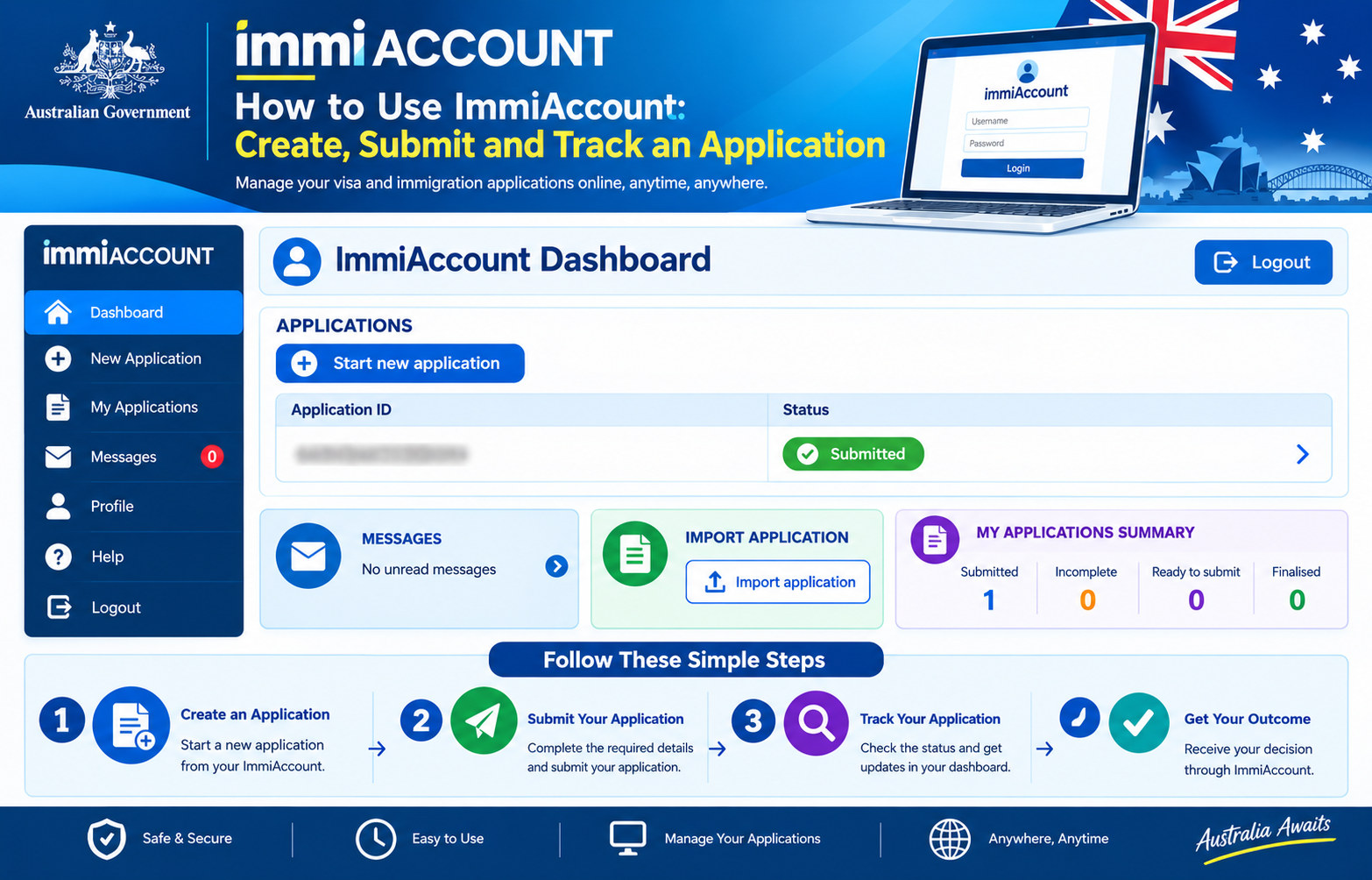
ImmiAccount is the Australian Department of Home Affairs’ online platform for many visa, citizenship and other services. Depending on the application and its stage, you may be able to start or continue a form, import or share an application, attach documents, submit and pay, read messages and check progress. The exact options differ by application type. Creating an account or saving a draft does not mean you have lodged an application.
Sources checked October 13, 2026. Use the official Home Affairs guides and ImmiAccount sign-in page. The department does not charge simply to create an account, but visa application charges may apply when you lodge. Never give your password or security codes to an unofficial agent, message sender or tracking site.
What ImmiAccount can—and cannot—do
ImmiAccount provides access to many Home Affairs online services, including many visa and citizenship applications. It can also allow a user to continue saved applications, import an eligible application, share access with another account or manage account information. Not every visa or service uses the same process, and an online form may be unavailable for a particular application or circumstance.
Check the official page for the exact visa subclass or citizenship process before creating a form. For example, the department says not to use ImmiAccount to apply for an Electronic Travel Authority (ETA); eligible ETA applicants use the separate official ETA service. Do not select a visa that merely sounds similar to your travel purpose. An ImmiAccount login is a technical step, not a decision about your eligibility.
Create an ImmiAccount or sign in
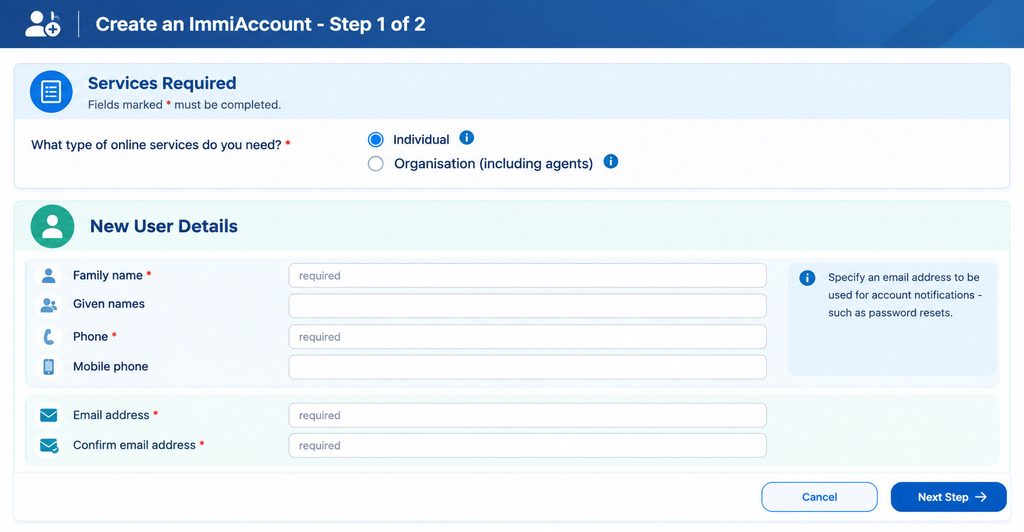
Use the Department of Home Affairs’ official ImmiAccount page. Individual applicants, family members helping an applicant and friends assisting with a form can create an individual account. Organisations, registered migration agents and sponsoring companies use an organisation account where appropriate. Choose the account type that matches how you will use the service.
During registration, enter an email address you can access. Home Affairs sends a verification code to that address, which you need to enter to continue. Use a strong, unique password and keep your recovery details current. Store the account details securely, especially if you expect to manage messages or deadlines over several months. Avoid shared inboxes that you cannot reliably monitor.
If you already have an account, sign in rather than creating another one unless the department instructs you to do so. Multiple accounts can make it harder to find an application or receive account messages. If you are unsure which email or username is attached to an application, use the official forgotten-username or password recovery options before starting a duplicate form.
Protect your login with multi-factor authentication
ImmiAccount uses multi-factor authentication (MFA) to add a second login check. Home Affairs describes using an authenticator app or, if needed, an email code. An authenticator app is generally safer than email-based authentication because an email account can itself be compromised. Follow the setup instructions displayed in your account and save any recovery information securely.
Never share a one-time code, password or authenticator setup key with someone who contacts you unexpectedly. A legitimate representative should not need your personal password as a substitute for authorized application sharing. If you lose access to your phone or MFA method, use the official recovery instructions; do not create a second account to bypass security.
Before starting a new application
Read the full visa or citizenship requirements first. Home Affairs’ step-by-step guides are tailored to individual application types, so a general checklist may leave out a route-specific requirement. Confirm your intended visa subclass, who is applying, where you will be when you apply, and which family members must lodge separate or linked applications. Check current documents, translations, charges and timing directly on the relevant official page.
Prepare accurate identity and application details before beginning: names as shown on passports, dates, addresses, travel or employment history where requested, and information about family members. Keep source documents accessible so you can answer consistently. If you are unsure how a question applies to your circumstances, pause and seek reliable advice rather than guessing or entering information simply to move to the next screen.
Start, save and continue a form
- Sign in through the official ImmiAccount page.
- Select the option to start a new application and choose the application that matches your visa or citizenship pathway.
- Read any terms and instructions shown before proceeding.
- Complete questions using information that matches your passport and supporting documents.
- Save the form as you go, then use the account’s application summary to return to an eligible saved application.
Questions can change based on your earlier answers. Read each one carefully and check the full application before submission. A saved form, an incomplete application or a “ready to submit” label is not proof that Home Affairs has received a lodged application. If you stop before the final submission process, you may need to sign in again and continue the saved form.
Importing or sharing an application
Home Affairs allows some applications to be imported into an ImmiAccount or shared with another account. Availability depends on the application type and its status. The account’s own instructions explain what details are needed and what access will be granted. A registered migration agent can share an application with a client through authorized features; sharing an application is safer than handing over login credentials.
Before accepting or sending a share request, confirm the identity and role of the other account holder and understand what they can view or change. Do not share an application with a stranger who promises a faster decision. If you are acting for a family member, use the process permitted for that person and keep responsibility for checking declarations and submitted information clear.
Attach documents the right way
The application form tells you which documents to attach and whether you must provide them before or after submission. Requirements vary: one application’s list should not be assumed to apply to another. Upload clear, complete files to the correct category and follow the file-type, size and naming instructions shown by the account. Include all pages requested, and make sure scans are readable and not cut off.
Do not email supporting documents to Home Affairs unless the department specifically directs you to use a particular channel. The department says you cannot attach documents to a finalised application, and uploaded supporting documents may no longer be available to access in ImmiAccount afterward. Keep your own copies of every original file and a record of what you uploaded. If a document is not in English, follow the translation requirements for your application and country; do not assume a friend’s informal translation is acceptable.
Some forms allow you to submit first and provide documents later, while others expect attachments before submission. Follow the instructions on your actual application and any subsequent request. If you receive a request for more information, attach the requested response to the correct application and meet the stated deadline.
Review, submit and pay
Before submitting, review names, dates, answers, declarations and attachments. Correct inconsistencies while the form is still editable. Make sure every applicant’s details are accurate and that you are authorized to provide information for anyone else included. A false or careless answer can cause serious problems; do not treat the submit button as a way to reserve a place while you decide what is true.
When the application is complete, follow the prompts to lodge it and pay any applicable charge. Fees are set by the Australian government and can change. Check the official fee information for the exact visa and applicant circumstances before payment. Your bank or payment provider may show a separate payment or currency-conversion charge; that is different from the government application charge.
Wait for the confirmation screen and save the transaction details, acknowledgement and application reference. Check the application summary to make sure the status reflects submission rather than a saved or unpaid form. If a payment appears to fail, do not immediately pay again through another site. First check the account and official payment guidance for the transaction outcome and what to do next.
Track an application and respond to Home Affairs
After lodgement, use the application summary to review status and messages. You may also be able to update certain details or withdraw, depending on the application and its stage. A status label describes progress; it is not a reliable promise of when a decision will be made. Processing times vary, so use current official estimates only as guidance, not as a guaranteed deadline.
Read every message and request in full. Home Affairs may ask for additional documents, information, biometrics, a health examination or another action. Follow the precise channel, format and due date in the request. Keep the acknowledgement and receipt, and monitor the email address linked to your account so you do not miss notifications. If your address, passport or contact information changes, use the correct official update process for your application.
If you are waiting for a decision, do not assume that a saved application or a pending status itself grants a visa, work permission or an extension of current status. Check the visa conditions and any bridging arrangements that apply to your situation through official guidance.
Common ImmiAccount problems
- Cannot sign in: Check the official username and password recovery routes, the email account used at registration and your MFA method. Do not share security codes with support impostors.
- Application is missing: Confirm you are in the account used to lodge it. If import is available for that application, follow the official instructions and use details from the acknowledgement.
- Upload fails: Check file size, format, readability and category against the on-screen requirements. Retain copies and try again through the account, not by emailing documents to an unrelated address.
- Payment or lodgement is unclear: Check the application summary and payment confirmation before retrying. Use Home Affairs’ official common-issues guidance to avoid duplicate payments or applications.
- Application says incomplete or ready to submit: Review missing questions, required attachments and payment prompts. Do not assume the application is lodged until the account confirms submission.
Before contacting support, check whether Home Affairs reports maintenance, a common payment issue, an attachment problem or an error message with a specific fix. If the problem continues, use the department’s technical support process. Provide only the information the official form requests and never send your password or authentication code.
Practical checklist before you finish
- Confirm the application type and use its current official requirements.
- Use the account you already have and keep MFA recovery secure.
- Make sure every answer and document is accurate and readable.
- Keep copies of forms, uploads, payment and notices outside the account.
- Verify that the application was submitted and paid, not only saved.
- Check your messages, deadlines and current visa conditions regularly.
Official access and related guides
For the official instructions on creating and accessing ImmiAccount, starting, sharing and managing applications, attaching documents, paying, and troubleshooting, use Home Affairs’ Applying online in ImmiAccount guide. To sign in or begin account registration, use the official ImmiAccount login page. Follow the instructions specific to your application; they take precedence over this general overview.
For an example of a country-specific study route, see our Australia Student Visa Subclass 500 guide. For updates from a visa application authority, see our visa application status guide.
GlobalVisora is an independent information platform and is not affiliated with the Australian government. This article is general information, not personal immigration or legal advice. Always check the current Department of Home Affairs instructions for your application before acting.