Canada visa photo requirements depend on the document and application route. For a temporary resident visa (TRV), IRCC specifies a printed frame of at least 35 × 45 mm and a chin-to-crown head height of 31–36 mm. Before ordering prints or preparing a digital photo, check what your application actually requests.
This guide covers visitor and tourist visa application photographs. It explains measurements, digital uploads, a photographer checklist and practical fixes for upload problems. For the rest of your application, see our Canada visitor visa guide.
Official instructions checked October 27, 2026.
Do you need printed photos, a digital upload or biometrics?
Start with the document checklist for your own application. A request for a passport scan, a request for a portrait and an appointment to collect biometrics are different tasks. Keep the exact document name and request open while preparing your files.
| Your situation | What to check | Next step |
|---|---|---|
| Applying online for a visitor visa | The personalized checklist created during your application | Prepare the requested documents and read any instructions beside the photo field. |
| Submitting a paper TRV application | The applicable guide, checklist and any visa-office instructions | Check whether paper photographs are required and follow the stated submission details. |
| Giving biometric fingerprints and a photo | Your biometric instruction letter and collection instructions | Follow the appointment instructions; keep any separate online document request in view. |
| Asked to provide a replacement photo | The new request, deadline and submission method | Use the route IRCC specifies in that request. |
IRCC’s visitor visa checklist guidance explains that online applicants receive a personalized checklist. The paper-application guide says applicants who must give biometric fingerprints and a photo do not need to include paper photos. That paper-photo exception should not be used to dismiss a separate upload request in your account.
Canada visa photo size: frame dimensions and head height
Use both measurements when checking a Canada visitor visa photo: the outside frame and the head inside it. A photograph can have the intended outside dimensions while the face is framed incorrectly.
| Photo property | TRV specification |
|---|---|
| Minimum printed frame | 35 mm wide × 45 mm high |
| Same frame in centimetres | 3.5 × 4.5 cm |
| Approximate frame in inches | 1.38 × 1.77 inches |
| Head height | 31–36 mm from chin to crown |
| Framing | Full front view, face centred, top of shoulders included |
| Photo age | Taken within the last six months |
| Print quality | Quality photographic paper; colour or black and white |
Source: IRCC’s temporary resident visa photograph specifications. The centimetre and decimal-inch entries are conversions. Crown refers to the top of the head or skull, rather than the highest point of the hair.
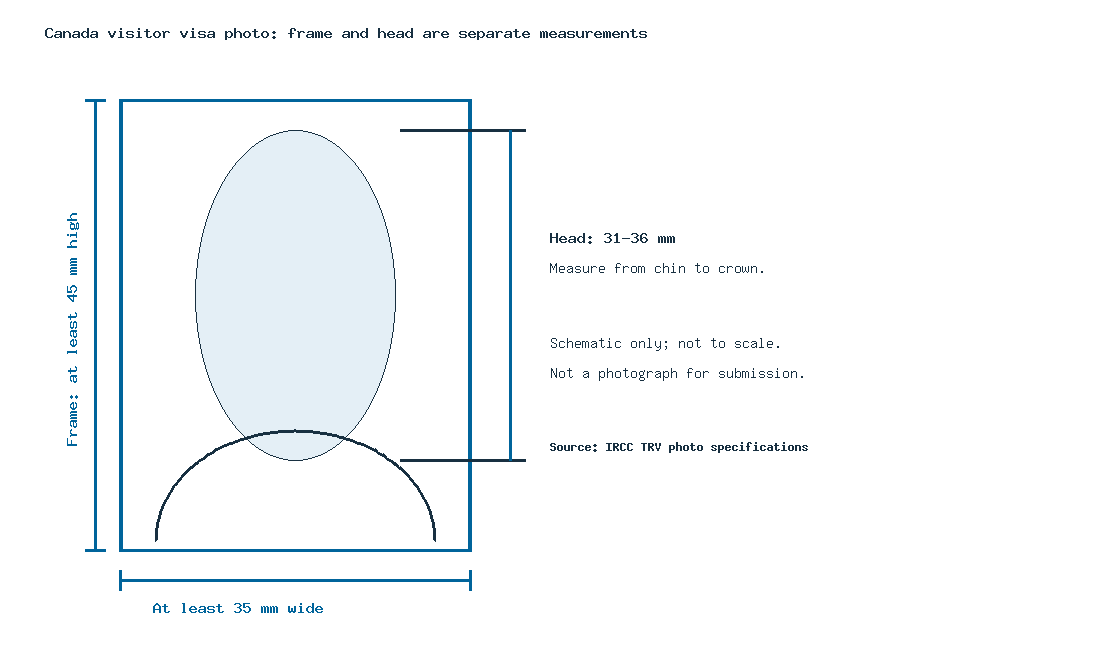
When discussing Canada visa photo dimensions with a studio, show the official specification instead of asking only for a “passport-size photo.” Keep the minimum-frame instruction and the head measurement together. A different frame size alone does not establish whether every other requirement is met.
Background, expression, glasses and head coverings
IRCC calls for a clear photograph against a plain white or light-coloured background, with a neutral expression and closed mouth. Non-tinted prescription glasses are permitted when the eyes remain visible and frames do not obscure them. Religious coverings must leave facial features unobscured. Digital photographs must be unaltered. Check the official appearance rules before the session.
For your Canada visa photo dress choice, practical preparation helps: take the instructions with you, check that the face is easy to see, and ask the photographer to inspect the image before you leave. Treat suggestions about clothing colours as photography advice unless your application gives an explicit rule.
If you wear glasses or a hijab, raise the question before the photo is taken. A photographer working from another country’s template may otherwise use that document’s instructions. Do not apply a US passport rule to a Canadian visa photograph simply because the studio is in the United States.
Canada visa digital photo requirements: pixels, format and file size
A Canada visa digital photo needs to match the instructions for the application receiving it. The general TRV printed-photo page does not establish one universal pixel count and file-size limit for every IRCC account.
For example, IRCC publishes a separate digital-photo section for International Experience Canada work permit applications. Use that program’s requirements when it is your application route, rather than treating them as a rule for all visitor visas.
Three measurements answer different questions:
- Millimetres or inches: the photograph’s physical dimensions when printed.
- Pixels: the image’s digital width and height.
- Kilobytes or megabytes: the amount of data in the file.
A millimetre-to-pixel conversion depends on resolution. An online calculator’s result is not, by itself, an official digital upload requirement.
Check your digital file before uploading
- Open the photo instructions beside the requested document field.
- Record any required format, pixel dimensions and file-size limits.
- Inspect the actual file properties. On Windows, use Properties and Details; on macOS, use Get Info or the image inspector in Preview.
- View the picture at a useful size so you can inspect the original capture.
- Select the correct applicant’s file and review any preview or validation message.
- Complete the submission steps and retain the confirmation.
Changing a filename from one extension to another does not convert its format. Keep an original copy before preparing a requested version, and avoid repeatedly saving a heavily compressed copy. Read the IRCC Portal instructions for the application and document-upload help.
What to tell a photo studio or photographer
Use this handoff checklist whether you are applying from Bangladesh, India, the US or another country. Your location helps you find a provider; the application instructions establish the requested photograph.
- Document: identify the exact visa or permit and applicant.
- Reference: bring the official photograph specification and any personalized request.
- Deliverables: confirm whether you need paper copies, an original digital file or both.
- Measurements: ask the photographer to check the frame and head height separately.
- Processing: show the unaltered-image instruction before any retouching or background replacement.
- Final check: compare what you receive with your checklist before leaving.
This is an applicant preparation checklist, not an official IRCC form.
Getting a Canada visa photo in the US
Before visiting a pharmacy or studio, ask whether it can produce the photo for your exact Canadian document. Confirm the deliverables and local availability rather than assuming a standard US photo package is suitable.
For example, Walgreens’ current photo-service page advertises an emailed digital copy with its standard purchase and advises checking other-country services with the local store. That does not confirm the correct Canadian TRV service at every branch. Call ahead with the official specification.
Photo upload problems: what to check next
A technical upload error and a request for a different photograph require different checks. Use the message shown in your own account rather than a generic limit from another application.
| Problem | Inspect | Next action |
|---|---|---|
| Unsupported format | Actual file type and formats listed for that field | Obtain an allowed file from the original image; renaming the extension is insufficient. |
| File too large | Displayed limit and actual file size | Follow the account’s file-preparation help while preserving the required image quality. |
| Insufficient dimensions | Pixel width and height | Ask for the original higher-resolution capture. Enlarging a tiny image does not restore missing detail. |
| Wrong preview or applicant | Filename, applicant name and selected document field | Correct the selection before submission. |
| Image looks unclear or incorrectly framed | Original capture against the applicable specifications | Ask the photographer to review it or retake it when necessary. |
| IRCC requests another photo | The new instructions, deadline and destination | Prepare the requested replacement and submit through the specified route. |
If IRCC asks for additional documents, its request identifies what to send and how. Follow the official replacement-document instructions for your account. Do not assume that choosing a file completes submission; follow the remaining steps shown.
Visitor visa photos versus passport, PR and permit photos
Choose instructions by document name, not by the word “Canada” alone. For a PR application or card, use IRCC’s separate permanent resident photo requirements, including its online-versus-paper choices.
For a Canada student visa or study permit photo, start with your study permit application requirements and its requested documents. For a work permit photograph, consult your work permit application route. A page about visitor visa photos should not replace those program instructions.
Common questions about Canada visa photographs
Is the Canada visa photo size 35 × 45 mm or 50 × 70 mm?
Use the TRV minimum frame and head measurements listed above for this document. Check the separate specification when preparing a passport or PR photograph. A familiar photo-template label is not enough to identify the correct application requirements.
What is the Canada visa photo size in pixels?
Read the digital-photo instructions for your application. Printed dimensions alone do not determine a universal pixel size: a conversion also needs a resolution. Keep a program-specific requirement distinct from a calculated print equivalent.
Do I need matte or glossy photo paper?
Use the paper instructions in the linked TRV specification and your applicable checklist. Confirm any further finish requirement there before paying for a particular studio package.
What should I write on the back of a printed photo?
For paper applications covered by Guide 5256, IRCC instructs applicants to put their name and date of birth on the back of both photos when paper photos are required. Check any applicable office instructions too. Do not transfer another document’s studio-stamp requirements automatically.
Can I use a free Canada visa photo editor or checker?
A photo tool may offer measurements or file information, but its result is not an IRCC acceptance decision. Read the applicable unaltered-photo instruction before using an editor. Avoid tools that promise visa approval; a photograph is only one part of an application.
Will a photo sample prove that my picture is acceptable?
No. An example can explain a measurement or illustrate an issue. Check your own file, the actual photograph and the instructions for your application. Keep any illustrative template separate from the image you submit.
Before you submit
Confirm the document, compare your photograph with the relevant instructions, inspect any digital-file properties, and check that the correct image was selected. Keep the original file and submission records. Use your visitor visa checklist to prepare the rest of the application.